Documents
10. Managing Shipment Documents
Shipment documents are managed directly within the Booking File, keeping important documentation connected to the relevant shipment and accessible to the users working on the file.
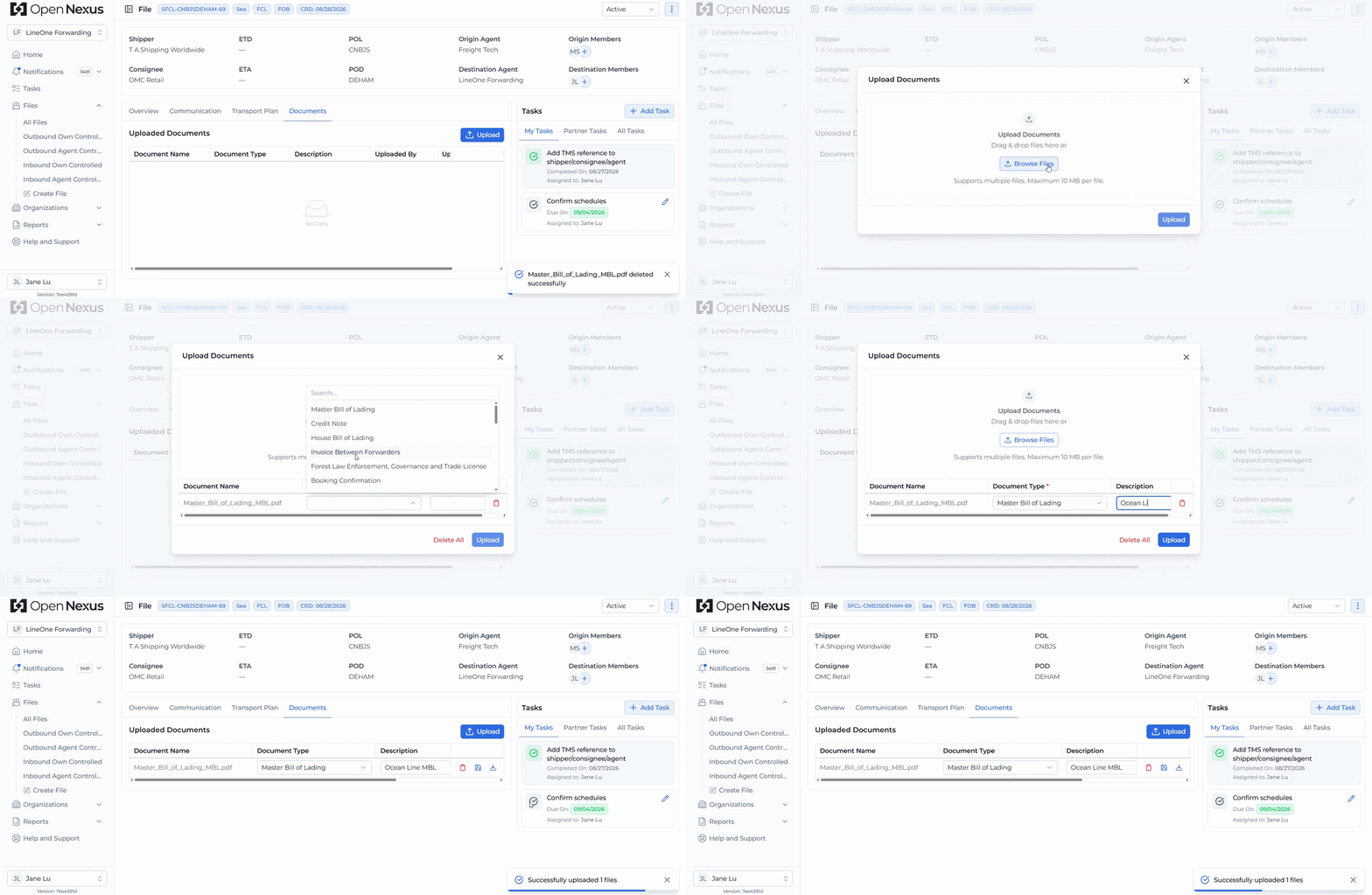
Open the Documents tab within the Booking File to upload, access, and download shipment documents.
Uploading Documents
To add a document to the Booking File:
- Open the Documents tab.
- Click the Upload button.
- Select the document you want to upload.
- Select the appropriate Document Type.
- Complete the upload to add the document to the Booking File.
Document types include, for example:
- Master Bill of Lading
- House Bill of Lading
- Invoice Between Forwarders
- Certificate of Origin
Once uploaded, the document is stored against the Booking File and is available to the relevant users working on the shipment.
Accessing & Downloading Documents
All documents uploaded to the Booking File are stored centrally and can be accessed from the Documents tab.
Users linked to the shipment can view the available documents and download them when needed throughout the shipment workflow.
This provides a shared location for origin and destination freight forwarders to access shipment documentation instead of exchanging documents across separate channels.
Hint:
Keep shipment documents within the Booking File so users working on the shipment can access the relevant documents from one central location.