

Creating by Email
Creating by Email
Each organization has a dedicated email address for the Booking Notes module. Any email sent to it is turned into a booking note automatically. This lets people who do not use the portal submit booking details without anyone re-entering them.
Finding the address
- Select + New Request from the Overview page or the Requests list.
- Select Create via Email.
- The organization's intake address is shown, with a copy button beside it.
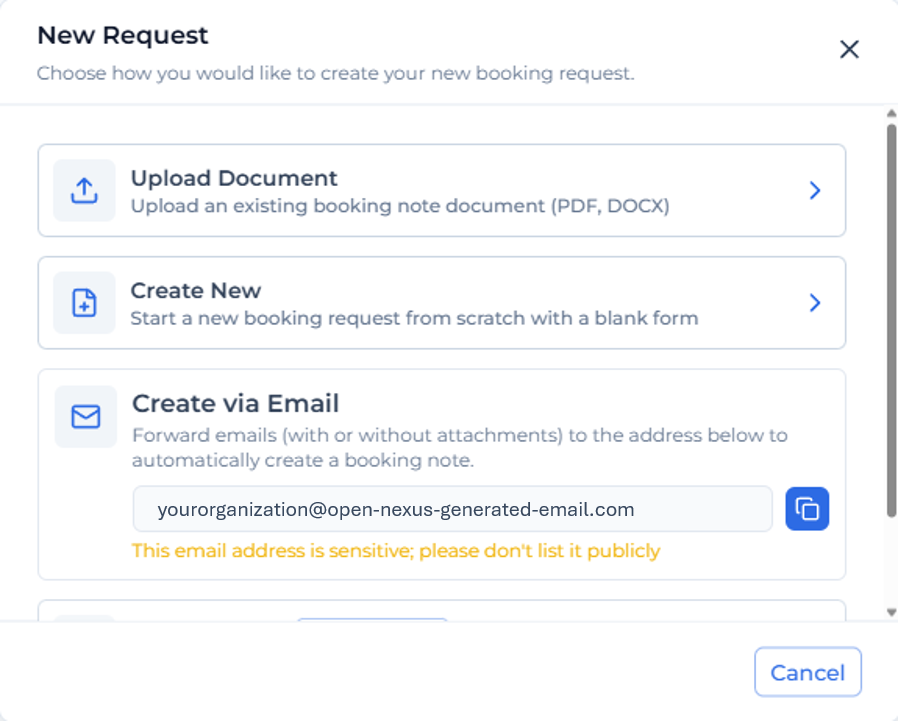
The address is unique to the organization and to this module. Emails sent to it are routed to that organization's Booking Notes and are visible to that organization only.
Who can send to this address
The intake address does not accept mail from just anyone. An email is only processed when it comes from a sender the receiving organization already recognizes, which prevents unsolicited mail from creating booking notes.
Two conditions have to be met:
1-The sending organization must be a partner organization. It has to exist in the receiving organization's Private Directory and be added as a partner. An organization that is not in the directory cannot send, whatever address the email comes from. See Organization Contact Directory.
2-The sender's email address must be known against that organization. There are two ways this is satisfied:
| Situation | What makes the sender valid |
|---|---|
| The partner organization is claimed and its people use Open Nexus | Any registered user of that organization can send, using their registered email address |
| The partner organization is unclaimed, or the person sending is not a registered user | Add that person as a contact on the organization record. Emails from a contact's address are then accepted |
The second case is the common one. A customer who emails booking details but has no Open Nexus login is handled by adding them as a contact on their organization, which authorizes that address without giving them an account.
Adding a contact is done on the organization record in the directory. Contacts added this way remain private to the organization that added them.
⚠️ Keep the address private
The address must not be published on a website, in a public directory, in marketing material, or anywhere else it could be found by people who were not deliberately given it.
Anything sent to it creates a booking note in the module. It should be treated as an internal address and shared directly with the specific customers, suppliers and colleagues who need it. A warning to this effect is shown next to the address in the modal.
How an email becomes a booking note
- An email arrives at the intake address, with or without attachments.
- A booking note is created immediately with source Email, status Processing, and the sender recorded in the Sender column.
- The system reads the email. Attachments are processed, and the body of the email is read as well.
- Data found in either place is used to fill in the booking note.
- When processing finishes, the booking note moves to Pending Review and appears in the Requests list.
- It can then be opened, checked, completed and submitted.
With and without attachments
With an attachment, the attachment is the main source and the email body is read as well. Details that appear only in the body — a PO number typed in the message, a delivery instruction — are picked up and added.
Without an attachment, the body is the only source. A well-written email containing the booking details will produce a usable booking note.
Where the same detail appears in both the attachment and the body and the two disagree, the attached document is taken as correct.
Checking what was picked up
The original email is displayed beside the form, showing subject, sender and body. It is read-only and scrolls independently, so the extracted values can be checked against what was actually sent. See Booking Note Form.
As with uploads, extracted values are a starting point and should be checked before submitting. See How Documents and Emails Are Read.
If the email could not be read
If there is not enough information in the email and its attachments to build a booking note, it is marked Failed. See How Documents and Emails Are Read.
Helping senders get it right
Extraction quality depends on what arrives. Anyone asked to use the address regularly should be told:
- Send booking details as an attached document where possible, in one of the supported formats.
- One shipment per email. Several bookings in one message produce one booking note.
- Put anything not in the attachment into the body in plain text. It will be read.
- Avoid sending details only inside images, screenshots or signature blocks.
Notifications
An email notification is sent when a booking note is created from an email intake, so its arrival is visible without watching the list. See Notifications.