

Product Update - September 14, 2026
🚀 Open Nexus Product Update (September 14, 2026) – A New Way to Stay Updated + Latest Improvements
Hello and good day,
At Open Nexus, we are upgrading how we share product updates with you. To make sure you are always among the first to know about new features, product improvements, and release notes, we are launching a new updates tool.
To ensure these notification emails land safely in your primary inbox instead of your spam folder, please take a quick moment to mark our official address as a trusted sender.
Sender Address to Save: noreply@open-nexus.com
Quick ways to ensure you receive our updates:
- Outlook Users: Right-click an email from us and select Junk → Never Block Sender. You can also add noreply@open-nexus.com directly to your Outlook Contacts.
- Move to Primary Inbox: If our emails land in your Spam, Junk, or Promotions folder, move the email to your Primary inbox or mark it as Not Spam.
- Add to Contacts: Save noreply@open-nexus.com to your email address book or contact list.
Share with your team: If you have teammates or colleagues who should also receive these updates directly, they can sign up using our Subscription Link.
We have exciting releases coming up, and we want to make sure your team has direct access to every new capability as soon as it goes live.
And with that, here are the latest improvements now available in Open Nexus.
🚀 Open Nexus Product Update – September 14, 2026
This release brings better report collaboration and previews, expanded Booking File filters, safer Booking File status changes, and several improvements to make shipment information easier to find and manage.
📊 Better Report Collaboration & Management
We've expanded Reports & Data Exports to make reports easier to collaborate on, reuse, and keep up to date.
Reports are built from Saved Views, using the filters, selected columns, column arrangement, and sorting already configured in the selected Saved View.
You can now:
- Share Edit and Delete permissions with other users in your organization. These permissions can be controlled independently, while the report creator always retains full access.
- Duplicate an existing report to quickly create a new report based on the same configuration.
- Update to Latest View when editing a report to bring in the latest filters, columns, column arrangement, and sorting from its linked Saved View.
Example: If your team has an existing report that another colleague needs as a starting point, they can duplicate it and create their own independent report without rebuilding the configuration from scratch.
For more details on Reports & Data Exports: Learn how to use Reports in Open Nexus

👀 Improved Report Preview
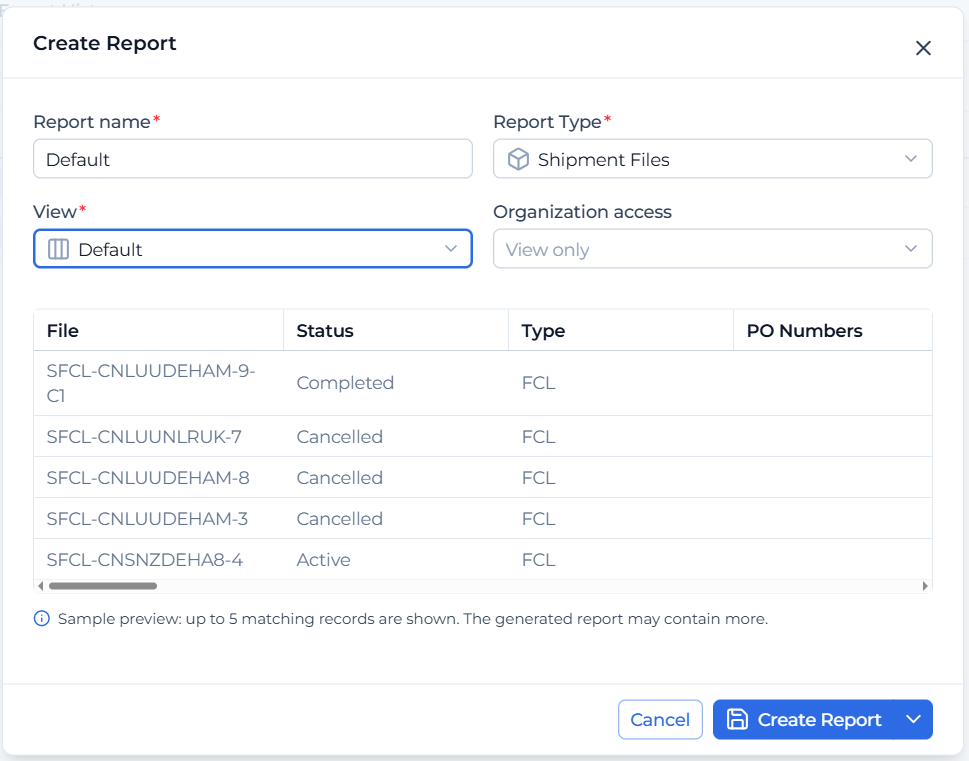
Creating and editing reports now gives you a clearer preview of the data that will be included.
Once you select a Saved View, the Report Preview displays up to five matching Booking Files using the filters, selected columns, column arrangement, and sorting already configured in that Saved View.
This makes it easier to confirm that you've selected the right Saved View and that the resulting report contains the information you expect before saving or generating an export.
🔎 More Booking File Filters
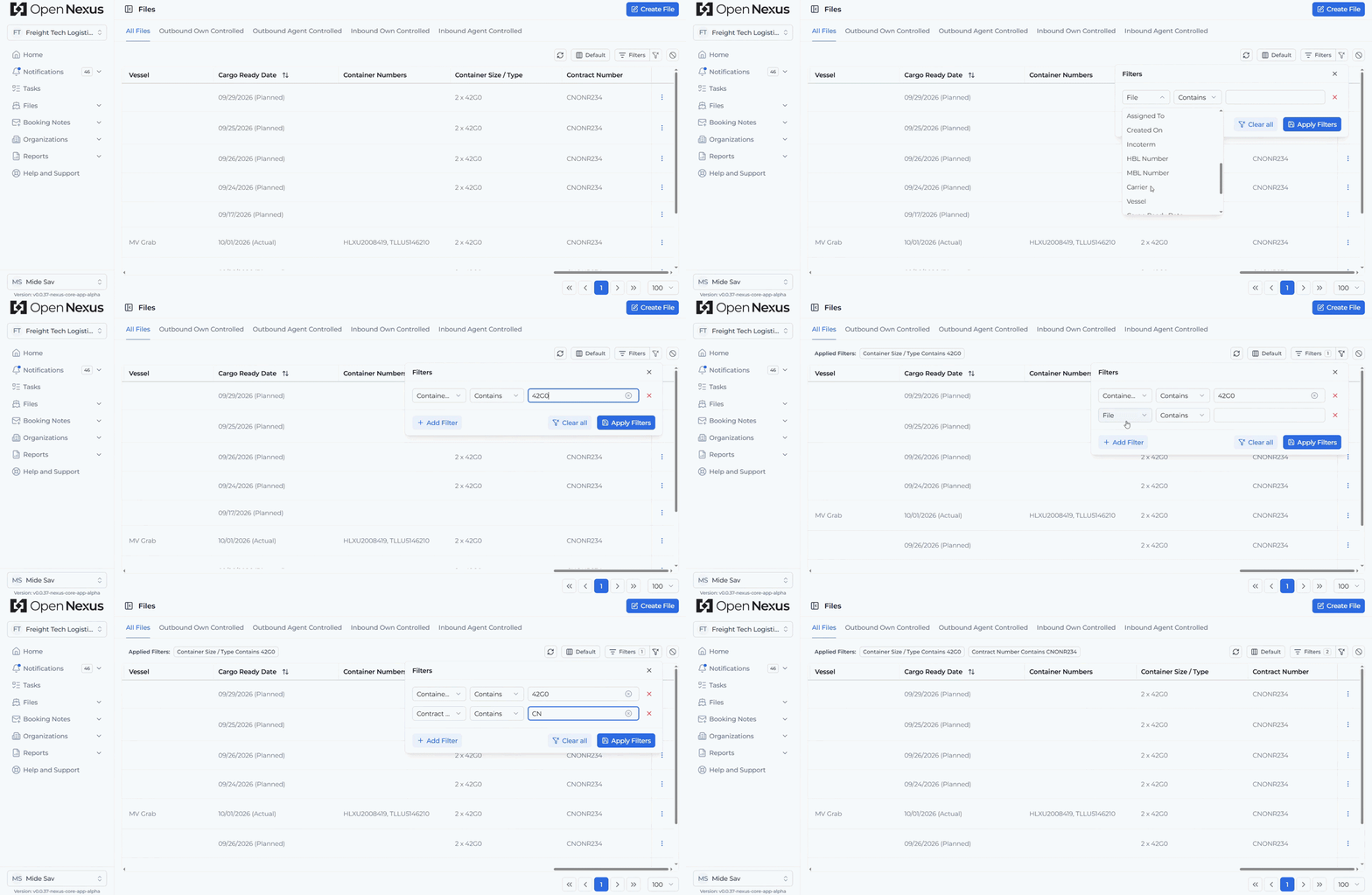
We've continued expanding Advanced Filters on the Booking File View Table.
You can now also filter by:
- Origin TMS Reference & Destination TMS Reference,
- Agent Organization (Origin and Destination Parties),
- Container Numbers,
- Container Size / Type, and
- Contract Number.
These additional filters make it easier to narrow down your Booking Files using the shipment and TMS information your team works with every day.
🌍 Port Names Now Displayed with POL & POD
POL and POD now display the Port Name alongside the UN/LOCODE, making locations easier to recognize without having to identify them from the code alone.
For example:
CNLUU – Leliu
You'll see this additional information in both the Basic Shipment Details and Booking File Top Summary. Where a port name is too long to display completely, you can hover over it to see the full location.
This gives you clearer location information at a glance while keeping the familiar UN/LOCODE visible.

✅ Confirmation Before Completing or Cancelling a Booking File
We've added a confirmation step before a Booking File can be marked as Completed or Cancelled.
This extra confirmation helps prevent accidental status changes and gives users a chance to confirm their action before the Booking File status is updated.

🔄 Clear Filters vs. Reset Table
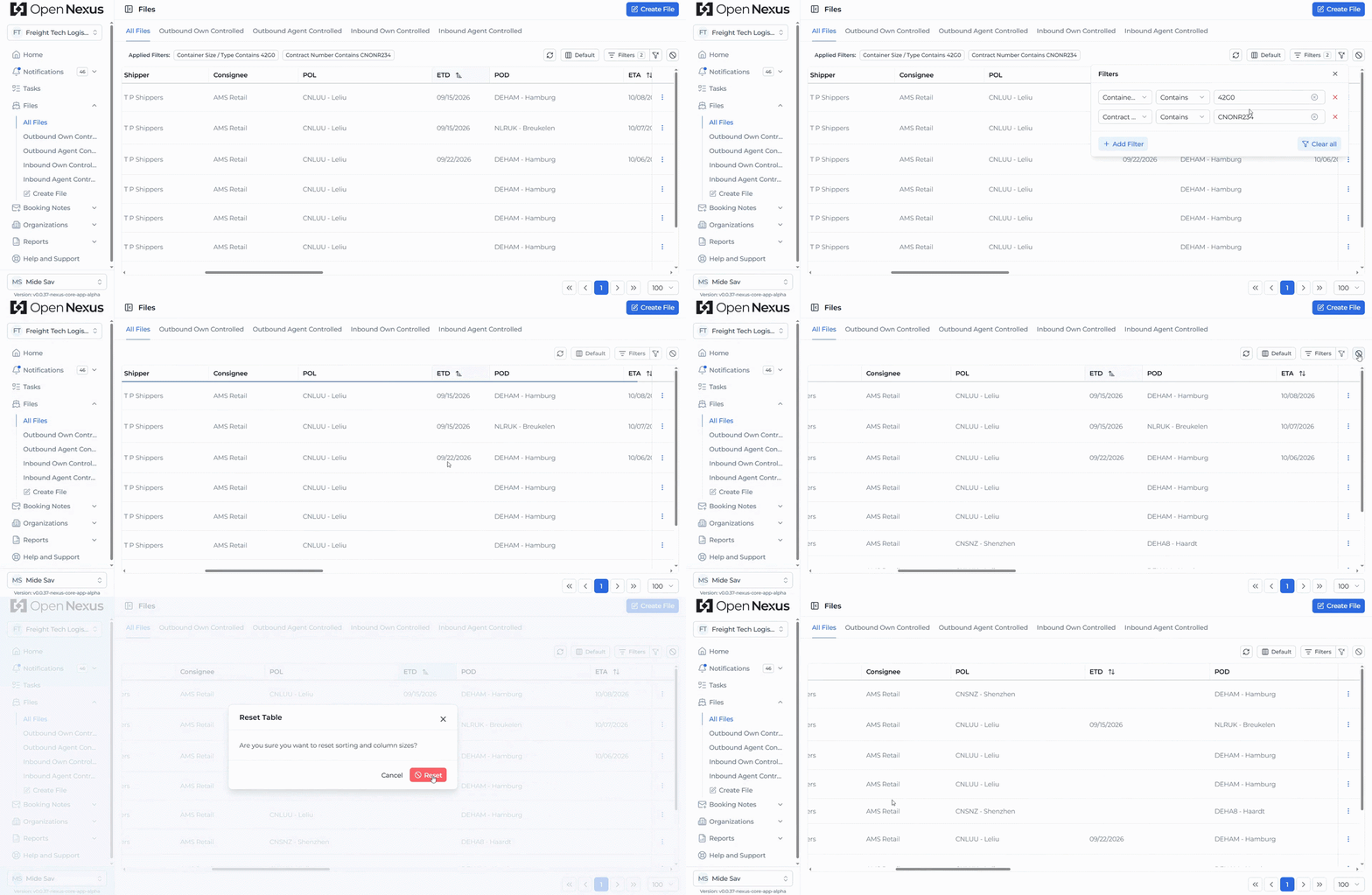
A quick reminder that Open Nexus provides two separate table reset actions, giving you greater control over what you want to clear:
- Clear Filter removes your active filters without affecting your sorting or adjusted column widths.
- Reset Table Sorting and Column Width restores column widths and sorting to their defaults without removing your active filters.
The Reset Table Sorting and Column Width button is also now only active when sorting or column width adjustments have been applied.
If your table isn't showing the results you expect, check whether filters or sorting are already applied. Clearing your filters or resetting your table can be a useful way to return to your expected results.
Try the Latest Features
Log in to Open Nexus today and explore Reports & Data Exports along with these latest improvements designed to make working with your shipment data more flexible and efficient.
If you have any questions or feedback, we'd love to hear from you. Please contact us at support@open-nexus.com.
Thank you for using Open Nexus.
The Open Nexus Team